Navigation Guide
The Node Declaration System Explained
This document is structured so that both human readers and AI agents can navigate it efficiently, processing what is relevant to their purpose and skipping what is not. The mechanism that makes this possible is the Node Declaration Table, which appears at the start of every section and sub-module in the manuscript. This guide explains how to read it and how to use it.
1. The Node Declaration Table
Every section and sub-module opens with a table in the following format:
Each field has a specific function.
Tier distinguishes a main-body Section from a Sub-Module. Sections carry the primary argument. Sub-Modules carry technical depth that supports the argument but is not required to follow it.
Status declares the current state of the content this node covers. Implemented means the described capability exists and is operational in the proof of concept. Specified means the capability has been fully designed but not yet built. Vision means the capability has been identified as a future direction but is not yet specified in detail.
Assumes lists the prior sections a reader must have processed for this node to make sense. If the listed sections are already known from prior reading or professional background, the reader may enter here without reading them first.
Contributes is a single sentence stating what this node adds. It answers the question: what will I understand after reading this that I did not understand before? It is the primary navigation aid for both human readers and AI agents assessing whether to engage with the full node.
Skip condition is a precise statement of when this node may be passed over. It is written to be testable: a reader can assess whether the condition applies to them and act accordingly. Skip conditions are not invitations to skip carelessly; they are declarations of what prior knowledge makes this node redundant.
Passes to lists the sections that directly depend on this node. If you skip a section, check this field in the sections that follow it: if your skipped section appears in their Assumes field, you may need to return.
Sub-Modules here lists any sub-modules that immediately follow this section. Sub-modules are always optional unless a downstream section explicitly lists them in its Assumes field.
Content Tag and Engagement Tag are optional extended fields introduced in §7.8. They are used in sections that form part of the manuscript’s community extension layer. When present, they appear on the same row as the Status field or immediately below it. They allow readers to filter sections by purpose rather than by position. Full definitions are in Table 7.8.
2. The Skip Condition: Instructions for AI Agents
An AI agent processing this document should apply the following rules.
If the skip condition is met, the agent may limit its processing to the first paragraph of the section and the Node Declaration Table. The first paragraph always states the section’s core claim or function; the Node Declaration Table provides the dependency structure. Together, these are sufficient for the agent to maintain an accurate structural map of the document without processing every section in full.
If the skip condition is not met, the agent must process the full section before proceeding.
Sub-modules are always optional. No downstream section depends on a sub-module unless that sub-module is explicitly listed in the downstream section’s Assumes field. An agent may skip all sub-modules in a first pass and return to specific ones when a query requires the technical depth they contain.
When answering a user query, the agent should first identify which sections are relevant by consulting the Contributes and Passes to fields, then process those sections fully. Sections outside this set may be processed at summary level only.
3. The Four Reading Paths
Sequential argument. Read every section in module order from Module 0 through Module 7, consulting sub-modules where the text references them. This path gives the fullest picture and is recommended for researchers engaging with the methodological contribution.
Modular reference. Identify the section most relevant to your question using the Table of Contents purpose annotations. Check that section’s Assumes field and read any listed prior sections you do not already know. This path is recommended for practitioners, implementers, and domain specialists.
Framework overview. Read Module 0 (Orientation) and Module 7 (Extension and Synthesis) only. Module 0 provides the full architectural map; Module 7 provides the eleven propositions that constitute the framework’s intellectual claim. Together they give the argument’s beginning and end without the internal machinery.
AI-assisted engagement. Upload the full document to an AI assistant. Use the audience-specific question catalogues in the Context Declaration to begin. The AI assistant will use the Node Declaration Tables to navigate the document precisely in response to your questions. You may also ask the assistant to identify which sections are relevant to a specific question before reading them yourself.
4. The Sub-Module Structure
Sub-modules follow immediately after the section they deepen. They are separated from the main section by a horizontal rule and open with their own Node Declaration Table. Each sub-module has its own skip condition and its own Tier field set to Sub-Module.
The purpose of this arrangement is to keep the main argument uninterrupted. A reader following the primary argument encounters the sub-module’s Node Declaration Table, assesses its skip condition, and either proceeds into the sub-module or returns to the main sequence. The argument does not require the sub-module; the sub-module does not require the reader to have read the section in any particular way before entering it.
Sub-module identifiers follow the pattern SM-X.X-Y where X.X is the parent section number and Y is an alphabetical letter distinguishing multiple sub-modules within the same section.
5. The Table of Contents
Every entry in the Table of Contents carries a one-line purpose annotation in italics. This annotation is the Contributes field stated even more briefly. Status indicators appear after each entry: ✓ for Implemented, ○ for Specified, and ◇ for Vision. Sub-modules are indented one level below their parent section and marked with the prefix symbol ⌐ to distinguish them visually from main-body sections.
Example Table of Contents entries: Module 3: Architecture ………………………………………….. 45 §3.5 Artefact Families and Schema Design ✓ Seven canonical families and five schema design principles … 52 ⌐ SM-3.5-A Canonical Artefact Schema Reference ✓ Complete field-level specifications for all families …….. 58 §3.6 Artefact Lifecycle, Validation, and Acceptance Gates ✓ From provisional generation through validated publication ….. 65
6. Worked Example
Hypothetical query: “I need to understand what fields the SignalsPack artefact carries and how its schema is validated.”
The agent consults the Table of Contents and identifies two candidates: §3.5 (Artefact Families and Schema Design) and SM-3.5-A (Canonical Artefact Schema Reference).
The agent reads the Node Declaration for §3.5:
The skip condition is not met because the query requires specific field-level knowledge (SignalsPack schema and validation), which the skip condition does not cover. The agent processes §3.5 in full.
The agent then reads the Node Declaration for SM-3.5-A:
The query requires the SignalsPack field-level specification and its validation rules. The skip condition for SM-3.5-A is not met. The agent processes SM-3.5-A in full and retrieves the SignalsPack schema fields and their validation rules from the table within it.
The agent does not need to process §3.6, Module 4, or Module 5 to answer this query.
This Navigation Guide is itself governed by a Node Declaration. It has no skip condition: it should be read by all users before engaging with the manuscript’s main body.
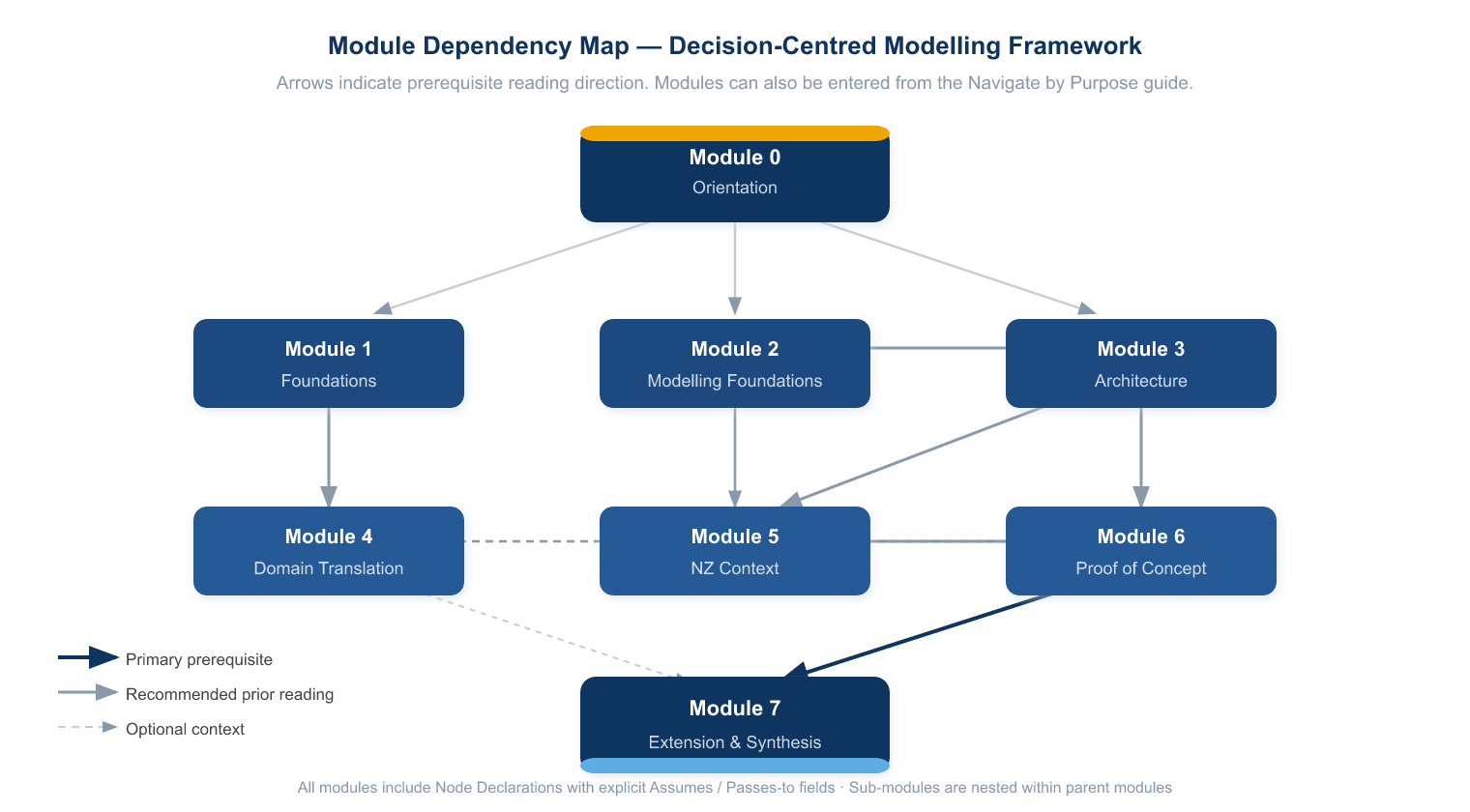
Framework Map
The following diagram shows the dependency relationships between modules. Arrows indicate prerequisite reading direction.